Showing posts with label Haskell. Show all posts

Friday, May 16, 2014

HaTeX-3.13: A summary of the latest developments

This week I have been coding for HaTeX, the LaTeX library of Haskell. If this is the first time you read about this library, take a look at it in Hackage or in GitHub.

I have closed really old tickets and made some important changes, and now I will let the library have a more stable time to check if these changes are worth in the long run. I think all these changes are positive, but I have to apologize for releasing two major versions in a single week. I don't want to give my users headaches, but I also want to provide them with a better library if that's in my hands.

Property Tests (QuickCheck)

The first thing I want to mention is the addition of a test suite to HaTeX. It is rather small currently, but it is already giving us benefits. The greatest impact has been in the parser, when the following property has been added:

fmap render (parseLaTeX t) == Right t

Here t :: Text is a randomly generated syntactically correct LaTeX code. It is important to note that this property gives us two facts:

  • Given a valid LaTeX input, parseLaTeX returns a value of type LaTeX.
  • If the parsed value is again rendered, you get the initial input.

In other words, parseLaTeX is a partial function (if we consider Left values as errors) that is defined if and only if the input is a valid LaTeX file, and render is its left inverse. These are some properties that I would expect from parseLaTeX in order to do a reasonable job. The good thing is that now they are automatically checked and, thanks to that, I have discovered many small bugs I never noticed before (thanks QuickCheck!).

I want to say as well that having HaTeX added to Stackage is giving us good benefits. I have been quickly prompted when HaTeX did not build with the last version of transformers, or when a test suite was failing. Thank you Michael for your great work!

Removal of TeXOp constructor

The LaTeX type has now one constructor less: TeXOp. This has simplified a little bit some other functions, mostly reducing code in case-by-case pattern matching. The reason to remove such constructor is that is was not providing anything that others constructors could not. Therefore, it didn't have much sense to have it there in the first place.

Pretty-Printer

Some users have written me complaining that the output of the render function applied to LaTeX values is unreadable and hard to debug. It contains big lines of agglomerated code, making hard to distinguish - for example - where an environment starts and where it ends. This is on purpose. HaTeX won't add any line break that the user does not specify explicitly. If it were done that way it would, for instance, make a paragraph break where it should not be one. And worse, the user won't have any workaround to solve it. However, it is reasonable to ask for a prettier output. This is what the new Pretty module addresses. It has not been widely used yet, so it can probably be improved.

The LaTeXC instance for LaTeXT

Back when the LaTeXC class was implemented, we needed to get values of type LaTeXT m a from LaTeX values for any type a, and the only value inhabiting every type is bottom, so we used that one. This has been done this way until now. HaTeX has been following an use-as-few-extensions-as-you-can policy, meaning that we stick with Haskell2010 as much as we can. But, since there was interest, I have added the TypeFamilies extension. The current LaTeXC instance has a ~ () in its context. This is also true for the IsString and Monoid instances, and for the numerical classes. Being honest, I still have to check what are the consequences of this, but I think time will tell us. At the moment, this change has simplified significantly the code of the Base.Writer module.

Back to parsec

The first LaTeX parser was written in parsec, but was later rewritten by Tobias Schoofs using attoparsec. Since the new parser was better - in the sense that was closer to have the properties listed in the first section of this post - I accepted the patch gladly and we have been using it with some variations (some of them important) until today. With time, it became clear that the uninformative parsing error messages of attoparsec were unacceptable for this case, where many input files were written by hand or fixed manually, and most of them small enough to not be worth to have a faster parser. This is why today I decide to dedicate my evening to port the parser back to parsec, and so I did. A combination of the type checker and QuickCheck have made the work very amusing.

Closure

If you are interested in a more detailed list of changes, it's probably worth a look at the commit list. If you think something in HaTeX has to be improved or fixed, do not hesitate in filling a ticket at the issue tracker. Thank you for reading to this point.

Happy hacking,
Daniel Díaz.

Monday, November 4, 2013

haskintex: Haskell within LaTeX

I am here today to announce my new package: haskintex. Actually, the package has been around in Hackage for some time now, but I didn't want to announce it. Although everything was ready for this release some days (weeks?) ago, I have been waiting for the Hackage server to update its Cabal version (see #85@hackage-server) to the 1.18 branch. This is because haskintex depends on HaTeX >= 3.9, and the new 3.9.0.0 version was failing to upload to Hackage due to an undefined cabal field (extra-doc-files) warning. This field was defined for the 1.18 version of Cabal and quickly used by HaTeX. HaTeX still builds with previous versions of Cabal, the only difference is that images in the documentation do not appear.

What is haskintex

haskintex is a tool that processes files, usually files that follow the LaTeX syntax. Although it has been programmed with LaTeX in mind, it was later clear that it can be used with other formats as well (with some restrictions). The purpose of haskintex is to include Haskell code within LaTeX files, and evaluate it or display it as desired. Therefore, it is similar in purpose to lhs2tex, but with a different approach. The input file is usually a .htex file, which is a LaTeX file plus some commands and environments like \evalhaskell{2+3}. haskintex would process these declarations running GHC on their argument and substituting the result in the output file. Something like \verb`5`. You can add things to the scope within a \begin{writehaskell}...\end{writehaskell} environment.

Calling HaTeX functions

However, the most interesting way to use Haskell within LaTeX is in combination with HaTeX. HaTeX is library that implements the LaTeX syntax in Haskell. Inside the \hatex{...} command, you can put any Haskell expressions of type LaTeX. When processed by haskintex, it will be type checked, evaluated and rendered as LaTeX code. This brings all the benefits from HaTeX without the need to write all the boilerplate HaTeX code for things that plain LaTeX would do just fine. For example, suppose you want to draw a logarithmic spiral. The code below will do the job for you.

\documentclass{article}
\usepackage{tikz}
\usepackage[utf8]{inputenc}
\author{Daniel Díaz}
\title{Embedding HaTeX in \emph{haskintex}}
\begin{document}
\maketitle
Below is the \emph{Spira Mirabilis} inserted using the HaTeX
package.
\begin{writehaskell}
import Text.LaTeX
import Text.LaTeX.Packages.TikZ.Simple

spiral :: Figure
spiral = LineWidth (Pt 2) $
    pathImage 0.01 (0,4) $
      \t -> ( a * exp t * cos (b*t)
            , a * exp t * sin (b*t)
              )
  where
    a = 0.1 ; b = 4
\end{writehaskell}
\hatex{center $ tikzpicture $ figuretikz spiral}
\end{document}

See the documentation of the TikZ.Simple module of HaTeX to understand the functions used above. You may want to use different HaTeX modules for other tasks.

More info about haskintex and its usage at the homepage of the project.

Thanks for reading,
Daniel Díaz.

Friday, August 16, 2013

Processing: Optimizations and FireFox

I have done a lot of commits to the processing GitHub repo since the last Hackage release. I have discovered dozens of bugs that are now fixed. I have also implemented some new nice features, like conditionals with custom values or arrays. However, the nicest change has been done in the Substitution Optimization Algorithm. At least, this is the one I am more enthusiast about! It took me a while to get arrays working correctly, but it wasn't so exciting. Well, maybe arrays with custom values are a bit magical! They handle a set a of arrays of potentially different types under the hood, so you think that you are dealing with a single array.

In any case, the optimization process has been improved greatly. Now it looks for common sub-expressions inside a set of optimizable values, which are instances of a class. Instances of this class are automatically generated using Template Haskell. The nice thing is that, an expression of type Float can be inside an expression of type Integer (for example, in round pi), however, the optimizer will find expressions that are nested even in expressions of other types. Furthermore, the optimizer is now able to take greater pieces of code to work with, since it is now able to detect which variables are mutated. Therefore, it is able to stick to the biggest piece of code where variables can be treated as constants. Neat.

Of course, since I am the developer of the library, I find all these words easy to understand, but for the reader they may be quite opaque. In the section below I will try to explain the Optimization by Substitution Algorithm which is fully implemented in the processing package.

Optimization by Substitution Algorithm

A problem that arises when you are automatically generating code for a language you cannot evaluate is that the output code is usually slow and repetitive. Consider the following code example in Haskell:

foo :: Int -> Int
foo x = 2*x + 2*x + 2*x

Apparently (perhaps some cool GHC optimization you should no rely on is avoiding it) we are computing 2*x three times. To avoid it, the general technique is to create a let or where clause and include the repeated computation in it.

foo :: Int -> Int
foo x = let y = 2*x
        in  y + y + y

Now it seems clear that 2*x is computed only once. What we have done is to observe a repeated pattern/computation and gave it a name for its result. We then have substituted all the appearances of the repeated computation with that name. This is an intuitive way to avoid repeat computations, and this is exactly the idea behind the Optimization by Substitution Algorithm. I am pretty sure that this has been done before, but I give it here my own perspective, applied to my library.

In processing.js (JavaScript), we can apply a similar technique to that we applied to Haskell. Consider the following assignment.

v = 2*x + 2*x + 2*x ;

We can create an auxiliar variable, store the result of 2*x in this variable, and then use it to calculate the value of v.

y = 2*x ;
v = y + y + y ;

And this is how we adapt the above technique to JavaScript code.

Unlike Haskell, processing.js variables are mutable. The same variable x may have different values, depending on the last assignment done to that variable. Each time an assignment is done, the value of the variable may change, and we can't know if the new value is going to be the same or not (probably not). For example, consider the following code.

v = 2 ;
v = 2*v ;
v = 2*v + 2*v ;

At first sight, it seems that we are doing the same operation three times. However, the value of v has changed over time. If we replace all the appearances of 2*v we alter the result of the program.

v = 2 ;
y = 2*v ;
v = y ;
v = y + y ;

In the first program, the final value of v is 16. In the second program is 8. We cannot make substitutions freely in this situation. The solution I came out is to keep track of every mutated variable. When we reach an expression that uses one of the mutated variables, we apply substitutions over the code we have traversed so far, without including the expression that uses the mutated variable. Once we are done with the substitutions in that fragment of code, we repeat the process starting from the expression containing the mutated variable. This way, each piece of code where we are applying the Optimization by Substitution is safe.

Is this enough?

After my testings I am very happy with the results. However, in some browsers, like FireFox, it seems that my current test example is not running smoothly. I have made a Pac-Man game (a slightly simplification of the original) and looks like FireFox is not able to run the script smoothly. Either we need further optimizations or FireFox is just not good with processing.js. Perhaps the problem comes from processing.js, which may be not efficient enough. In any case, the game runs perfectly in Chrome/Chromium. I haven't tested with other browsers yet. Try it yourself here.

In the near future

The development of the Haskell processing library is not going to stop yet! More features are to come, and more bugs are to be found (and fixed!). Please, do not hesitate in try it yourself and report any annoyances in the issue tracker.

Thursday, August 8, 2013

Getting started with GHC hacking

After reading this blog post by Jason Dagit with the same title as the one you are reading now, I opened a new terminal session and cloned the GHC repo to my computer. Then, I successfully built GHC. Easy and faster than I thought. Online docs talk about hours of compiling process, when for me it only took some minutes (about 20-30 minutes). But, yeah, I provided the -j3 parameter to compile it in parallel. It works like a charm.

After having GHC built from the source for my first time, I decided to make a modified version of GHC. This version is aimed to really professional Haskell hackers who don't need any help from any source to know which commands are available in GHCi.

This is just my first step to get involved in GHC coding. :)

Monday, August 5, 2013

Processing: Key events

After being thinking and then hacking on processing yesterday, now key events are alive. After implement the feature, and add access to it from the interactiveFigure function, I wrote a code example to see it working. It was really helpful since it showed up some bugs I was not aware of. For example, variable numbers contained in conditionals were wrong. I have uploaded to Hackage a new version fixing this bug (and some other) and with the new feature of key events. Probably, we will find more bugs in the feature. In the meanwhile, please, update to the new version.

I post here the output of the key events demo (code here). Click over the canvas to make it work. Press W to move the black square up, A for left, S for down and D for right.

To interact with keys using the simple interface, use the interactiveFigure function. There is an argument of type [(Key, w -> w)] to handle key events. Each pair included in the list will specify a key, and the transformation over the current state that particular key does. As simple as that.

Saturday, August 3, 2013

From Haskell to Processing

I am happy about my last Haskell project. Its name is processing, and it is a library aimed to generate processing.js code. Actually, the purpose is to create interactive web animations, and processing.js is just the selected backend.

inCircles n =
  let t = intToFloat n * 0.03
      r = 100
  in  Circle (r * sin t, r * cos t) 20

I found the process of creating the library both funny and exciting. Phantom types, Template Haskell, Monads, ... I have used all the Haskell artillery to make the library nicer for the user, with some extra work from the developer (me). A lot of work still needs to be done. However, I am going to make it public right now, since it is already capable of working reasonably well.

Some days ago I published one of the output scripts in reddit to make sure that these animations are compatible with different browsers and settings. And it seems that it worked for everyone. Here is the animation I posted (try to move your mouse inside).

The reason I started working on this library is that I was looking for a library to write web animation scripts, without the need of running a server for them. Mainly, because I do not own a web server (I only have a web hosting, where I can upload these scripts). I looked through several choices, and processing.js suited my purpose very nicely.

Levels of abstraction

The library is built by levels of abstraction, and I have allowed the user to use any of the levels, hiding selected entities to make sure the user builds correct processing code. For example, you won't be able to use a variable before it is defined, create a variable twice, or calling a function where it does not make much sense. The compiler will stop you. The library levels are classified in the following form. Each one is built on top of the previous one.

  • Primal. This level is actually hidden in an internal module. It defines the abstract syntax tree of a processing script, how to print it, and other pretty basic stuff. However, it is one of the largest modules. It is the core of the library.

  • Basic. This level exports a writer monad which produces processing code. Imperative feeling. It is not really convenient, but it served me as starting point to work in the next level of abstraction. I exported it since it does not do any damage, and also because it has the property that the generated processing code is predictable.

  • Mid. Full-featured like the basic level, but more convenient. Still imperative feeling, but it makes sense given the nature of processing. It works using events, with things like

    on Draw $ do
       ...
    
    or
    on MouseClicked do $
       ...

    The output processing code produced by this level is optimized using a common-subexpression recognition. It searches for commonly done operations, and create variables for them where they are only done once.

  • Simple. The most convenient level. Haskell-ish feeling. Create values of the Figure datatype (defined in the same module) and let the library decide how to write the processing code for you. It includes several options, like static image displaying, time-dependent animations or even interactive animations (very experimental yet). It is inspired by the gloss library, which I think is the perfect example of easy-to-use animation library.

Using the Simple interface I have created this recursive animation.

You can see the complete code here. More examples are to be added in the future.

Future plans

In the near future some of my planned additions are: arrays, conditional values, pre-made figures, images (the type is there but there is no function to create them) and more examples. I also have to do more testing and check if the library documentation is clear enough for a new user. Any contribution in this regard would be really appreciated. The library code lives in GitHub.

Thanks for reading,
Daniel Díaz.

Tuesday, June 25, 2013

HaTeX 3.6: Texy class, Babel, Fontenc, TikZ and more

It has been a long time since the last release of HaTeX. However, the development of the Haskell LaTeX library has not stopped in all this time. In fact, this release comes full of new features and bug fixes. Below a short description of the changes.

Bug fixes

Let's start having a look to the bugs that have been fixed in HaTeX 3.6:

  • The family of autoBraces functions has been fixed. It didn't create correct code (credits to leftaroundabout).
  • The verbatim function now expects a Text value instead of LaTeX code (credits to leftaroundabout).
  • Size modifiers functions are now protected adequately (reported by jvilar).
  • Fixed Color Render instance.

Some of these bugs may have been annoying some people for a long time now. My apologies to this people for the late release.

Texy class

A new class has been defined. Its name: Texy. The definition is as follows:

class Texy t where
  texy :: LaTeXC l => t -> l

This class provides a function to render different types to a LaTeX value. Basically, it defines a pretty-printer which output is LaTeX code. Useful to render vectors, matrices or trees. More details are given in the proposal of this feature.

Babel

Babel is a well-known LaTeX package useful to deal with documents written in languages other than US English. It is a basic feature but it has not been added until now. The module exports a Language type and some functions that use values of this type. See the Text.LaTeX.Packages.Babel module.

Fontenc

A short package to select the desired font encoding of your document. Pretty basic feature now available in HaTeX.

TikZ

Doubtless, the most exciting new feature of this release. TikZ is a frontend for PGF (Portable Graphics Format), a package for creating graphics using scripts embedded in a LaTeX document. Using the TikZ package, writing some simple scripts gives you high quality results. The HaTeX TikZ module exports an interface to create this scripts and embed them in the rest of the HaTeX code, so you can program the graphics that appears in the LaTeX document from Haskell. Two layers of abstraction are provided. First, the module Text.LaTeX.Packages.TikZ exports an interface closer to the original TikZ. With this interface, you have to create paths and then use them to draw, fill, clip, etc. In addition, a PathBuilder monad is provided to create these paths. The alternative interface is much more attractive. Figures are created in a similar way to gloss. A simple, recursive and intuitive datatype describes how the figure looks like. Then, applying a certain function to the figure will generate the TikZ script, that you can insert in the HaTeX code right away. An example is worth a thousand words.

Definition of the figure.

myFigure :: Figure
myFigure = Scale 2 $ Figures
  [ RectangleFilled (0,0) 1 1
  , Colored Green $ RectangleFilled (-1,1) 1 1
  , Colored Red   $ RectangleFilled ( 0,2) 1 1
  , Colored Blue  $ RectangleFilled ( 1,1) 1 1
    ]

Output image.

Learn more about this in the Text.LaTeX.Packages.TikZ.Simple module.

Ending

I will probably be extending the documentation and testing different things. There are a lot of improvements to do in TikZ yet, but I thought that it is a good moment for a release. And, certainly, those suffering from the bugs described above will be thankful. Unfortunately, the HaTeX User's Guide keeps getting outdated.

Wednesday, April 17, 2013

HaTeX 3.6: Proposal for Texy class

Description

This is a proposal for a new feature I would like to see (and implement) in HaTeX for its next version. It consists in a new type class, with tentative name Texy (tex-like or tex-ify shortened). Other names are to be proposed, if any other better is found. The class would contain every type whose values can be pretty-printed in LaTeX form. Therefore, the definition of the class would be as follows:

class Texy t where
  texy :: LaTeXC l => t -> l

We can also make Texy a subclass of Render, so we can have a default implementation using rendertex.

class Render t => Texy t where
  texy :: LaTeXC l => t -> l
  -- Default implementation
  texy = rendertex

But I am not sure if this is suitable. The purpose of Texy is to build, from Haskell values, more complex LaTeX expressions than just rendering to Text, which, in the other hand, it is no more than a Show instance after all. It may work with numbers but not with more complex values like fractions or matrices.

Applications

A first application could be Rational pretty-printing as fractions using the frac function. However, we also have a problem here: the constructor % for rational numbers is already in use in our library. Perhaps we should rename the comment operator to %:? I have not seen an extensive use of this operator yet.

We would also be able to create LaTeX values for tuples, resizing the parenthesis in the tuple appropriately using autoParens.

Another application, perhaps more sofisticated, is pretty-printing matrices. Since the elements of the matrix would be a Texy instance as well, we can use texy to pretty-print to LaTeX matrices which may contain fractions or any other user-supplied value. This is an interface much more flexible than the current one (using a plain Render instance for the elements).

When rendering trees (see Text.LaTeX.Packages.Trees.Qtree), we are already using a LaTeXC l => (a -> l) parameter in order to pretty-print the elements of the tree. This is a more free version of the Texy class, which allow the user to supply different ways to generate LaTeX values from a single type. However, this is not a point against the current proposal, since this functionality can be kept as it is and added wherever is needed.

I honestly think this would be a good improvement.

Saturday, April 13, 2013

Haskell Platform from source in Linux

So I spent my day installing Haskell in my new Linux (Ubuntu-12.10) machine. Also, I have cooked a delicious cake. :)

In brief, these are the minimum packages I needed to install before starting with Haskell:

  • libgmp3c2. GHC needs this to perform arbitrary precision arithmetic. You may also need libgmp-dev.
  • zlib1g-dev. Needed for the zlib library in the Haskell Platform.
  • freeglut3-dev. Nedeed for the Open GL bindings in the Haskell Platform.

If the Haskell Platform configure still complains about the Open GL C library, did you try to install libgl1-mesa-dev?

Stop looking further! This is all you need to get the Platform installed from the source. Well, this, and the source by itself. Once you have this just follow the instructions in GHC and the Haskell Platform to finish your installation. Also note that linking of executables requires tons of memory. This is what killed my PC. If this happens to you, you should set swappiness to 10. That may solve the problem. If not, you can always try with a lighter version of Linux.

Good luck, haskellers!

Sunday, March 24, 2013

Benchmarks on matrix multiplication

I have been tuning for performance the matrix library, specially matrix multiplication. I have been using the well-known Strassen's algorithm to achieve sub-cubic complexity, but extending with zeroes the matrix to the next power of two order to match the hypothesis of the algorithm. Obviously, this method didn't work very well, but I took it as a starting point. From this point, my idea was to mix the standard multiplication with Strassen's idea, and to not expand the matrix unnecessarily.

After some work, I ended up extending the matrix to a square matrix of the next even order. Then apply one iteration of Strassen's algorithm. This process is iterated until certain order. Smaller matrices to this fixed order are multiplied using the definition. I have tried different switcher orders and benchmarking to see what's the best choice. These are benchmarks using switcher order k = 150. To understand it, note that multN means multiplication of square matrices of order N and that Definition and Strassen mixed mean that the multiplication has been done by definition or using my mixed algorithm respectively.

This benchmark table is hosted here.

Both take a very similar time for small entries, but, as the matrix grows, the difference gets bigger and bigger in favor of the mixed algorithm. This is a nice result that will be applied in the next release of matrix (0.2).

Tuesday, March 19, 2013

HaTeX 3.5

It's time for a new release of HaTeX!

The following changes have been made since the last release:

  • Fixed some minor bugs.
  • Remake of the parser, now using attoparsec instead of parsec. Also more correct and tested. Thanks to Tobias Schoofs for his contributions.
  • Extension of the AMSMath module. Thanks to leftaroundabout for his contributions.
  • Applicative instance for LaTeXT.
  • New functions for rendering matrices. This includes a new dependency in the matrix package.
  • And some other minor changes.

A complete list of changes can be found at the commit history. The new version is up in Hackage so update yours!

Sunday, March 17, 2013

Writing a new library: Wavy

I have two proposals for this Spring Break.
  • Release the version 3.5 of HaTeX.
  • End up the first layer of my new library: Wavy.

HaTeX 3.5

HaTeX has been in stand-by for a while now and I want to upload a version of HaTeX that at least contains the changes I have made so far. Hopefully, I will add some new features. I am thinking about a matrix writer, since is a pain to write matrices right now. If you take a look to the last changes on github, better support for math typesetting has been added thanks to leftaroundabout. He is (or has been) also writing an extension for HaTeX to make math typesetting more sophisticated. Also, toschoo has improved the parser and now it uses attoparsec. These are good news for HaTeX.

Wavy

In the other hand, I am writing a new library. Its name is Wavy. It is a super kool library that read, writes and manipulates sounds very nicely. Yes, I know, lot of libraries have been written doing exactly the same. Exactly the same? Well, I think they are all different in some sense, and this is just another new approach. If it is going to be a better or worse approach is something I don't care, as long as is useful to somebody. And I already find it useful for myself! Although, of course, it would be great if somebody else find it interesting, so I will do my best to make of Wavy a nice library. To begin with, I started writing a user manual. I think is looking pretty good, but that is something that Haskell users should decide in my place. As an extension, I wrote a library that writes sound waves in PDFs. So yes, I am having a lot of fun! And it's everything written in Haskell!

I hope to have something more mature to show after the Spring Break, but I think is moment to start sharing this thoughts with the community. Below is a code example that shows Wavy in action writing a sine wave in a .wav file.

import Data.Sound
import Data.Sound.WAVE

main :: IO ()
main = encodeFile "sine.wav" $ fromSound 16 s
 where
  s = sine 5 1 100 0

Wednesday, May 2, 2012

Printing types

The following exercise consists in write a function that prints the type of a given monomorphic function. No, we are not talking about type-inference. We will use the one that Haskell brings. Anyway, the task is to define a function writeType that, given some Haskell value (which can be a function), print its type on the screen.

It's not a hard exercise, so it can be tried by a beginner that already knows how to work with Haskell types. Try it before read the solution.

This is also my first attempt to create a blog post with Pancod and HsColour from a literate Haskell source code.

Solution

The approach of the solution is similar (identical) to the one taken in the Data.Typeable base module. We will import the intersperse function, which will be useful when defining a pretty-printer for types.

import Data.List (intersperse)

Our first mission is a function that, for some type a, returns its type signature. Something like typeOf :: a -> Type. But we need to first define the Type datatype.

data Type =
   TCons String [Type]
 | TList Type
 | TTuple [Type]
 | TFun Type Type
   deriving Show
  • The TCons constructor is for type constructors, like Int, Maybe, IO or Map.
  • The TList for lists of a given type.
  • The TTuple for tuples. With the empty list you get the unit type (()).
  • Finally, TFun is the type constructor for functions.

Note that one can, actually, make all types only with the TCons constructor (think how if you don't know it), but I still prefer this way.

Since we want of typeOf to run over every type, a good way to achieve this is to use a typeclass and implement specific methods for each type.

class Typed a where
 typeOf :: a -> Type

Now is trivial to make some instances.

instance Typed Int where
 typeOf _ = TCons "Int" []

instance Typed Float where
 typeOf _ = TCons "Float" []

instance Typed Bool where
 typeOf _ = TCons "Bool" []

instance Typed Char where
 typeOf _ = TCons "Char" []

And that's the way for types of null arity. Note that we always discard arguments. This is necessary, because we really need to avoid depending in values. We will have problems if the compiler tries to reduce some expression. Even it would be nonsensical, because the type of a value has nothing to do with one of its values.

Now, let's define our first type trick. If we want to define instances for types with positive arity, we will need to apply typeOf with argument(s) of the inner(s) type(s).

Here is provided the deconstructor for types with arity one.

decons :: t a -> a
decons = undefined

As you can see, it is not actually defined. All we need is to use its type, so the definition does not matter. Note why we did not want of typeOf to try to evaluate its argument.

Let's apply this to the Maybe type.

instance Typed a => Typed (Maybe a) where
 typeOf m = let t = typeOf $ decons m
            in  TCons "Maybe" [t]

The same trick works with lists.

instance Typed a => Typed [a] where
 typeOf xs = let t = typeOf $ decons xs
             in  TList t

It's the turn for tuples. We will do only the 2-uple, since for other tuple orders the same idea is valid. Since the constructor of 2-uples has arity two, we need another deconstructor.

decons2 :: t a b -> (a,b)
decons2 = undefined

I'm sure you already figure out how to define the deconsN function for any N. Using the deconstructor with tuples we have the following instance.

instance (Typed a,Typed b) => Typed (a,b) where
 typeOf tup = let (x,y) = decons2 tup
              in  TTuple [typeOf x,typeOf y]

The good thing is that all types are traversed recursively. For example, with typeOf (1,Just 2), it's reduced to TTuple [typeOf 1,typeOf (Just 2)], then to TTuple [TCons "Int" [], TCons "Maybe" [typeOf 2]], and finally to TTuple [TCons "Int" [], TCons "Maybe" [TCons "Int" []]]. Well, this evaluation is not true, but it works like that (replacing with undefineds everywhere!). What does this work is the Haskell type system. We are only playing with types, never with values.

The last instance we will do is for the function type constructor. Though, if you think about it, there is not something new. The arrow -> is just a type constructor with arity 2.

instance (Typed a,Typed b) => Typed (a -> b) where
 typeOf f = let (x,y) = decons2 f
            in  TFun (typeOf x) (typeOf y)

However, our problem does not end here (though here ends the most interesting part). The problem was to print the type of a given function. The next step is to write a pretty-printer function for types.

First, it will be handy to have a function that tell us if a type will need to be parenthesized when appears as an argument for some type constructor. For example, Int -> Int in Maybe (Int -> Int).

plural :: Type -> Bool
plural (TCons _ xs) = not $ null xs
plural (TFun _ _) = True
plural _ = False

An argument of an applied type constructor only will need to be parenthesized when its arity is not null. A function always will need it (because it's a constructor with arity two). No other will thanks to the syntax of tuples and list types. They are already parenthesized in some way.

However if the type constructor is the arrow -> the parenthesis are only needed when the left argument is a function type, since is infix and right-associative. For example, Maybe Float -> (Float -> Float) does not need parenthesis (I put them to make clear the association order), but (Maybe Float -> Float) -> Float needs them. Let's define then a function that test if a type is functional.

isFun :: Type -> Bool
isFun (TFun _ _) = True
isFun _ = False

To surround an expression with parenthesis we define the par function.

par :: String -> String
par str = concat ["(",str,")"]

It's time for our printType :: Type -> String function. For expressions that must be parenthesized when needed we will use the variant printTypeIf. It will put parenthesis when a test function holds.

printTypeIf :: (Type -> Bool) -> Type -> String
printTypeIf f t = (if f t then par else id) $ printType t

Now the full pretty-printer, using all the mentioned above.

printType :: Type -> String
printType (TCons n ts) = unwords $ n : fmap (printTypeIf plural) ts
printType (TList t) = concat [ "[" , printType t , "]" ]
printType (TTuple ts) = par . concat $ intersperse ", " $ fmap printType ts
printType (TFun t1 t2) = unwords [ printTypeIf isFun t1 , "->" , printType t2 ]

Finally, the required function writeType :: Typed a => a -> IO () can be written now immediately.

writeType :: Typed a => a -> IO ()
writeType = putStrLn . printType . typeOf

So we are done! You can try the next example:

example :: (Int -> Int) -> Maybe Bool -> Maybe (Int -> Int)
example f mb = fmap (\b -> if b then const 0 else f) mb

And that's all!

Closure

I think this is a very funny exercise, and that's why I posted it here. I hope you enjoy it like I did. You can get the code of this post from GitHub.

Good luck, Daniel Díaz.

Monday, April 30, 2012

HaTeX 3.3: Release notes

I was really really wishing this release! I put a lot of efforts on it and now I feel pretty good! All right, let's see quickly what's new. A list of changes is contained in the package source distribution, in the ReleaseNotes file.

Class system

Where are all those .Monad modules? They are missing!

Yes, yes. There is not .Monad modules now! Instead, there is a new class: LaTeXC. Both LaTeX and LaTeXT are instances of it, so a single module can contain both interfaces. More details in a previous post.

Trees

I have a tree in Haskell and I want to print it nicely. What can I do?

Now you can use HaTeX! How? Simple. Use directly the tree type defined in HaTeX or transform the one you have to it, choose a function to render the nodes and, finally, use the tree function to obtain the LaTeX code that prints the tree.

The HaTeX User's Guide

Finally I wrote a guide for HaTeX! At least, a stub of the guide.  And I made it open source! So you can contribute also to the guide!

I will change it, extend it and improve it all the time. A ready-to-read PDF version is also available.

Till the next time

I am going to continue working improving the library and the guide. I think HaTeX has reached a point of more stability. Good news, I guess. Now, I hope you enjoy these changes. I will write here any news.

Good luck,
Daniel Díaz.

Saturday, April 28, 2012

HaTeX 3.3: HaTeX with class

So I finally decided to merge the normal (what sometimes I called applicative) interface with the monadic one. It was not easy to me, but I feel like doing the right thing. I thought: "If I would release this library for the first time, how you would like it to be?" The answer then was "merge both interfaces!".

As a consequence of this decision, I have to admit that my work as maintainer has been reduced considerably. Now HaTeX-meta is deprecated, until HaTeX needs a similar tool, and I have about the half of modules to maintain.

Although the version has been bumped to 3.3 (being a major revision), everything code that worked until today must to work now. The only change you may need to do is to drop de .Monad in the import list. If you have some issue, please, make me know it.

I hope all you feel happy with this.

About the implementation

All I did is to define the following class:

class (Monoid l,IsString l) => LaTeXC l where
 liftListL :: ([LaTeX] -> LaTeX) -> [l] -> l

It allows to lift any function over LaTeX to a function over any type l of the class, as follows:

fromLaTeX :: LaTeXC l => LaTeX -> l
fromLaTeX l = liftListL (\_ -> l) []

liftL :: LaTeXC l => (LaTeX -> LaTeX) -> l -> l
liftL f x = liftListL (\[x] -> f x) [x]

liftL2 :: LaTeXC l => (LaTeX -> LaTeX -> LaTeX) -> l -> l -> l
liftL2 f x y = liftListL (\[x,y] -> f x y) [x,y]

And you can continue with number of arguments of your desire. For N arguments:

liftLN :: LaTeXC l => (LaTeX -> ... -> LaTeX) -> l -> ... -> l
liftLN f x1 ... xN = liftListL (\[x1 ... xN] -> f x1 ... xN) [x1 ... xN]

Now we are ready to express all functions changing each LaTeX with a type l instance of LaTeXC. The idea is to separate LaTeX arguments and other arguments and apply a liftLN function in the following way:

foo :: LaTeXC l => l -> A -> B -> l -> C -> l
foo l1 a b l2 c = liftL2 (\l1 l2 -> old l1 a b l2 c) l1 l2
 where
  old :: LaTeX -> A -> B -> LaTeX -> C -> LaTeX

Here, the function old is the original definition of foo. There are plenty of examples in the library (all funcions are now defined this way). As a contributor you may want to see it.

Since LaTeX and LaTeXT are instances of LaTeXC, now all functions work at the same time for both types.

The User's Guide

I started to write the HaTeX User's Guide. I'm doing it open source. It contains an introduction and explain some basics of HaTeX. The source code repository lives here.

The release in Hackage will be done when the User's Guide becomes more complete.

Saturday, April 21, 2012

Parsing with Haskell

I really LOVE to create parsers in Haskell!

Below, an example of a simple markdown parser (using the parsec library).

module Syntax (
   Syntax (..)
 , Text
 , parseSyntax
 , ParseError
   ) where

import Data.Text
import Data.String
import Text.Parsec
import Text.Parsec.Text
import Control.Monad (join)

{- Syntax Table

Italic: /.../
Bold: *...*
Language switch: $...$
Quote: {...}
Link: <...|...>
Image: [...]
Paragraph: |...|
Big: ^...^

-}

data Syntax =
   Raw Text
 | Italic Syntax
 | Bold Syntax
 | Lang Syntax
 | Quote Syntax
 | Link Text Text
 | Image Text
 | Par Syntax
 | Big Syntax
 | Seq Syntax Syntax
   deriving Show -- For debugging

reschars :: [Char]
reschars = "/*${}<>[]|^"

p_Syntax :: Parser Syntax
p_Syntax = fmap (Prelude.foldr1 Seq) $ many1 $ choice $ fmap try [
   p_Raw
 , p_Chars   Italic '/'     '/'
 , p_Chars   Bold   '*'     '*'
 , p_Chars   Lang   '$'     '$'
 , p_Chars   Quote  '{'     '}'
 , p_CharsT2 Link   '<' '|' '>'
 , p_CharsT  Image  '['     ']'
 , p_Chars   Par    '|'     '|'
 , p_Chars   Big    '^'     '^'
   ]

parseSyntax :: Text -> Either ParseError Syntax
parseSyntax = parse (withEOF p_Syntax) "SyntaxSource"

----------------------------------------------------

p_Chars :: (Syntax -> a) -> Char -> Char -> Parser a
p_Chars f c1 c2 = fmap f $ between (char c1) (char c2) $ p_Syntax

p_CharsT :: (Text -> a) -> Char -> Char -> Parser a
p_CharsT f c1 c2 = char c1 >> (fmap (f . fromString) $ many1 $ noneOf [c2])
                           >>= (char c2 >>) . return

p_CharsT2 :: (Text -> Text -> a) -> Char -> Char -> Char -> Parser a
p_CharsT2 f c1 c c2 = do
 char c1
 l <- many1 $ noneOf [c] 
 char c
 s <- many1 $ noneOf [c2]
 char c2
 return $ f (fromString l) (fromString s)

p_Raw :: Parser Syntax
p_Raw = fmap (Raw . fromString) $ many1 $
           try (char '\\' >> choice (fmap char reschars))
       <|> noneOf reschars

withEOF :: (Stream s m t, Show t) => ParsecT s u m b -> ParsecT s u m b
withEOF = (>>= (eof >>) . return)

Sunday, April 15, 2012

HaTeX: Trees and problems

Trees

Since a time ago, I wanted to add trees to HaTeX. Some way to, given a Haskell tree, create a LaTeX output according to it. So I created the datatype:

data Tree a =
   Leaf a
 | Node (Maybe a) [Tree a]

and started thinking about what LaTeX package I should to use in order to drawing trees. Since there are several good options, I decided to keep the Tree datatype in a separated module and write different implementations in different modules with similar interfaces. Then, I started with the qtree package and, in a few minutes, I had an example working. So I was happy for the moment.

The problem

But my happiness did not last long. The method used to transform a Haskell tree into a LaTeX value was to have a function that creates a LaTeX value from each node and, then, build the tree following the LaTeX tree syntax. So, the type of the function, called tree, was:

tree :: (a -> LaTeX) -> Tree a -> LaTeX

And this worked pretty well. The problem came out when I wanted to run metahatex in order to create the analogous monadic version. The modus operandi of metahatex is to read the type of the functions and infer from it their monadic implementation, re-using the original implementation. For example, if we have:

foo :: LaTeX -> a -> LaTeX

then, metahatex (importing the former qualified as App) do:

foo :: Monad m => LaTeXT_ m -> a -> LaTeXT_ m
foo lm a = do
 l <- extractLaTeX_ lm
 textell $ App.foo l a

where extractLaTeX_ gets the LaTeX value produced by the LaTeXT monad and textell puts LaTeX values again in the monad (like the tell method of the writer monad).

This method has worked perfectly until now. But, what happens if we try to apply it to the tree function? As we needed to transform a value of type LaTeX to another of type LaTeXT_ m for foo, we will need to do so from a a -> LaTeXT_ m typed value to a a -> LaTeX typed value. And that is impossible!

Searching a solution

I never liked the idea of write the monadic code manually, that would be write duplicated code. I went then to eat a pizza and think about it. Typeclasses came to my mind. When I returned to my computer, I started to search what minimal functions I need to render the tree. Then, I wrote a typeclass and made LaTeX and LaTeXT_ instances of it. See the definition of the resulting typeclass:

class (Monoid l, IsString l) => LaTeXTree l where
  texbraces :: l -> l
  texcomms :: String -> l
  totex :: Render a => a -> l

The first and second method are abstractions of the TeXBraces and TeXCommS type constructors! And the other is the abstraction of the rendertex function! Making LaTeX and LaTeXT instances of this typeclass allow us to construct a tree function valid to both types. But this is not the end. The same idea is applicable to the whole library, so normal and .Monad modules can be merged using a typeclass with abstractions of all LaTeX constructors!

Conclusion

Well, this idea had come to me a time ago, but I just realized today how useful it can be. And now, I feel a bit odd taking this approach only to trees. What should I do?

Monday, February 20, 2012

HaTeX: Chapter 3.2

It's time for a new release of HaTeX: the version 3.2, as announced in my previous post. I'm glad each time I see my library get better. Although the major version is increased again, I expect backwards compatibility, in spite of the changes done in some type signatures. I have tried to get previous code working.

Get HaTeX 3.2 from Hackage: http://hackage.haskell.org/package/HaTeX-3.2.

This is how HaTeX has changed this time.

The LaTeX Parser

It makes me happy to get working a parser of LaTeX. I have tested it with some examples (for instance, with the "fibs.hs" example, included in the library) with a reasonable output. Anyway, the parser is not mature yet. Future working on it will be done when a bugged output is found parsing some LaTeX code.

Greek alphabet

The AMSMath module is still very incomplete, but now it contains the entire greek alphabet.

The graphicx package

A new module with a new LaTeX package has been added. This time was for the graphicx package. The point here is to get all to be done with types, wherever possible. The way to achieve this is to define datatypes that will force you to put correct arguments to the functions. So the includegraphics function receives a [IGOption] and a FilePath as arguments, where each IGOption is a typed representation of each valid argument for includegraphics.

Changes in documentclass

Until now, documentclass function had type:

documentclass :: [LaTeX] -> String -> LaTeX

So if you want to set the font size to 12pt, you had to do:

documentclass [rendertex $ Pt 12]

or to do the trick:

documentclass ["12pt"]

which looks quite dirty.

Following my all-typed approach, I defined a new datatype (ClassOption) for documentclass arguments. This way, the former get done like this:

documentclass [FontSize $ Pt 12]

I find this more correct. Anyway, the second way still work, while the first one don't.

Other minor changes

Other minor changes have been done, like GHC 7.4 compatibility (thanks to Alexey Khudyakov) or addition of some new functions. To view a complete list see the commit history of the library.

Thursday, February 2, 2012

News about HaTeX

A lot of news about HaTeX have happened since the last time I wrote here about it. I want to sum up all of them now, with the 3.2 version release in mind.

HaTeX-3.1.0 and warnings

There was a release of the version 3.1.0 (along HaTeX-meta-1.1.0). It was announced in Haskell-Cafe [1].

The key novelty in this release is the incorporation of Warnings. Warnings are data generated from a LaTeX value checking. They give you information about your LaTeX value (e.g. if you skipped the document environment, or if you called to an undefined label). They are called "Warnings" instead of "Error" because they won't stop the execution.

Other new features are: Num instance for LaTeX and LaTeXT, an implementation of the LaTeX AMSThm package and a directory with examples (currently only one) shipped with the package.

HaTeX-3.2

The next release will be the 3.2 version.

The main new feature is a LaTeX code parser. This means you can read a file with LaTeX code and get its AST in Haskell! Although is still uncompleted and untested, I'm sure this feature will become HaTeX in a more complete library.

Before the release, I want to ask: what do you think this new version must to have?

HaTeX closer

In order to make easier collaboration of developers, I hosted the HaTeX code in GitHub [2]. And I already receiving contributions!

It also was very useful to place all together the code repository, an issue tracker and a wiki. So, if you are interested in HaTeX, feel free to contribute by any of the ways.

A mailing list [3] is also open to everybody, so we can discuss there about any topic related someway to HaTeX.

I also created a Twitter account for HaTeX-related tweets [4].

As you can see, there are a lot of ways to being connected with this project! I have done this to make easier as possible contributions in the future.

The lack of a manual

But not all news are good! HaTeX still lacks a manual. I have been writing one, but I stopped a while ago and I'm thinking now to continue this work. Sorry for this!

Thanks

Finally, I want to say thanks to all people who has contributed in some way. Thanks!

References

[1] - Announce of HaTeX 3.1.0 in Haskell-Cafe: http://www.haskell.org/pipermail/haskell-cafe/2011-December/097416.html
[2] - HaTeX in Github: https://github.com/Daniel-Diaz/HaTeX
[3] - HaTeX mailing list: http://projects.haskell.org/cgi-bin/mailman/listinfo/hatex
[4] - HaTeX Twitter account: https://twitter.com/HaTeX_updates

Saturday, November 19, 2011

Image processing

Motivation

The last couple of days I have been working in a set of utilities for manipulating images. I have done functions for read, write, modify and view them. I have worked with PPM images [1]. I know they are too expensive, but also have a very easy syntax.

I started working with this because a partner told me about how to encrypt an image and give it to two folks, while no one can know the original image, but together can solve it.

I don't know if having control over PPM images is useful for someone else. I'm thinking about if it has worth to upload this work to Hackage [2]. I saw a couple of packages about the same issue, but I actually don't like none of them.

PPM as data

First at all, we need a data structure where store our PPM images. In a first try, I decided to use an Array [3] of RGB values. I changed my idea when I realize that modifying an Array is expensive (maybe, I am wrong here, can somebody confirm it?). A mutable array [4] was not an option, because I wanted to keep pure my code. Then, I shifted to Map [5]. Actually, this was a bit arbitrary, but after testing it, I moved again to IntMap [6]. IntMap is far more efficient than Map, and make unions very fast! Then, I decided to use unions for operations between PPM images, and the current implementation is built on top of an IntMap.

I wanted to make a simple interface, so my basic operations were:

getPixelUnsafe :: PPM -> Int -> Int -> RGB
putPixelUnsafe :: PPM -> Int -> Int -> RGB -> PPM

With this couple of functions it might be easy to implement almost every functionality we want to have, keeping the PPM type absctract. Anyway, I will sometimes re-use methods of the IntMap to make the library faster. I tagged these functions as "unsafe", because if the coordinates of the requested pixel are out of range of the PPM image, they will cause problems. We will use them only in contexts where we are sure that the coordinates are valid.

So, the first and base library provides a pure interface for create and manipulate PPM images, and a pair parser/render of PPM images. As an example:

createPPM :: Int -> Int -> RGB -> PPM

?> renderFilePPM "black.ppm" $ createPPM 100 100 0

This call creates a black 100x100 PPM image. As you can see, RGB values are an instance of Num. In the example, fromInteger 0 = RGB 0 0 0. Moreover, abs acts like id, negate calculates the inverse color and signum turns a color into the grayscale.

PPM image viewer

The next tool I created was a PPM image viewer. I used GTK [7] to create the GUI. This step was very easy. After parsing a file, we just get the RGB value in each pixel and, using Cairo [8], print it in a drawing area. The code of the renderer is short so I will post it here:

module PPMViewer.Render (
 ppmRender
 ) where


import Graphics.Rendering.Cairo
import Codec.Image.PPM


ppmRender :: PPM -> Render ()
ppmRender ppm = do
 let w = getWidth ppm
     h = getHeight ppm
 sequence_
  [ do let rgb = getPixelUnsafe ppm x y
           r   = fromIntegral (rgbRed   rgb) / 255
           g   = fromIntegral (rgbGreen rgb) / 255
           b   = fromIntegral (rgbBlue  rgb) / 255
       setSourceRGB r g b
       rectangle (fromIntegral x) (fromIntegral y) 1 1
       stroke
    | x <- [ 1 .. w ] , y <- [ 1 .. h ] ]


I felt a bit odd using rectangles to print pixels. Is there another option? I don't know too much about Cairo, so if anyone knows a better implementation, I will be very glad to know it.

PPM image converter

Yes, we now have an interface that in theory can create any image, but creating a whole image pixel by pixel is non-viable! This is why I created the next tool: a PPM image converter from other formats (PNG, JPG, whatever). I used here again GTK, and since it has functions that read image files and turn them to Pixbufs, my solution was to create a function that transform a Pixbuf into a PPM data. Here is the code:

module PPMConverter.Pixbuf (
 pixbufPPM
 ) where


import Graphics.UI.Gtk
import Data.Array.MArray (readArray)
import Codec.Image.PPM
import Codec.Image.PPM.Internal
import Control.Applicative
import Data.Word (Word8)
import qualified Data.IntMap as Map


pixbufPPM :: Pixbuf -> IO PPM
pixbufPPM pb = do
 n <- pixbufGetNChannels pb
 w <- pixbufGetWidth     pb
 h <- pixbufGetHeight    pb
 r <- pixbufGetRowstride pb
 arr <- (pixbufGetPixels pb :: IO (PixbufData Int Word8))
 let xs :: [IO (Int,RGB)]
     xs = [ do let getp :: Int -> IO Int
                   getp = fmap fromIntegral . readArray arr
               r <- getp p
               g <- getp $ p + 1
               b <- getp $ p + 2
               return (pixelToInt w x y , RGB r g b)
                 | x <- [ 1 .. w ]
                 , y <- [ 1 .. h ]
                 , let p = (y-1) * r + (x-1) * n ]
 a <- foldl (\r x -> liftA2 (uncurry Map.insert) x r) (pure Map.empty) xs
 return $ PPM w h a


I guess this admits a lot of improvements. Indeed, I getting space problems with this function for big images.

The encryption algorithm

Now, let's see a working example of these tools: the encryption algorithm motivated by the problem introduced at the beginning of this text. As a first step, we convert a PNG file with the PPM converter:

Left: the original PNG image. Right: the PPM image output.

Albatross are so cute! Well... now we save the file wherever you want. We can see it with the PPM viewer:

The PPM Viewer

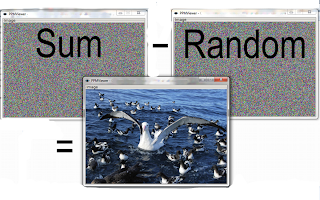
It's time to encrypt this image. The first step is to create a random image of the same size of the original. Then, sum pixel by pixel and coordinate by coordinate (module 255) both images. The random and sum images form the two pieces of the puzzle. If we subtract one from the another we will get the original image!

But, what happens if we do the operation backwards?


Scary! But we have obtained the negative of the original image.

Operations between pixels are of trivial implementation using this library. And are very fast because they use union of IntMap, which are indeed very fast!

Conclusion

This is a sample of images (PPM here) implemented in Haskell. It was an interesting (and funny) exercise for me. If you are interested in have this functionality available publicy, make me know it.

Thanks for read,
Daniel Díaz.

References

[1] The PPM image format: http://netpbm.sourceforge.net/doc/ppm.html
[2] Hackage: http://hackage.haskell.org
[3] Arrays: http://www.haskell.org/ghc/docs/latest/html/libraries/array-0.3.0.3/Data-Array.html
[4] Mutable arrays: http://www.haskell.org/ghc/docs/latest/html/libraries/array-0.3.0.3/Data-Array-MArray.html
[5] Maps: http://www.haskell.org/ghc/docs/latest/html/libraries/containers-0.4.1.0/Data-Map.html
[6] IntMaps: http://www.haskell.org/ghc/docs/latest/html/libraries/containers-0.4.1.0/Data-IntMap.html
[7] GTK library: http://hackage.haskell.org/package/gtk
[8] Cairo library: http://hackage.haskell.org/package/cairo